


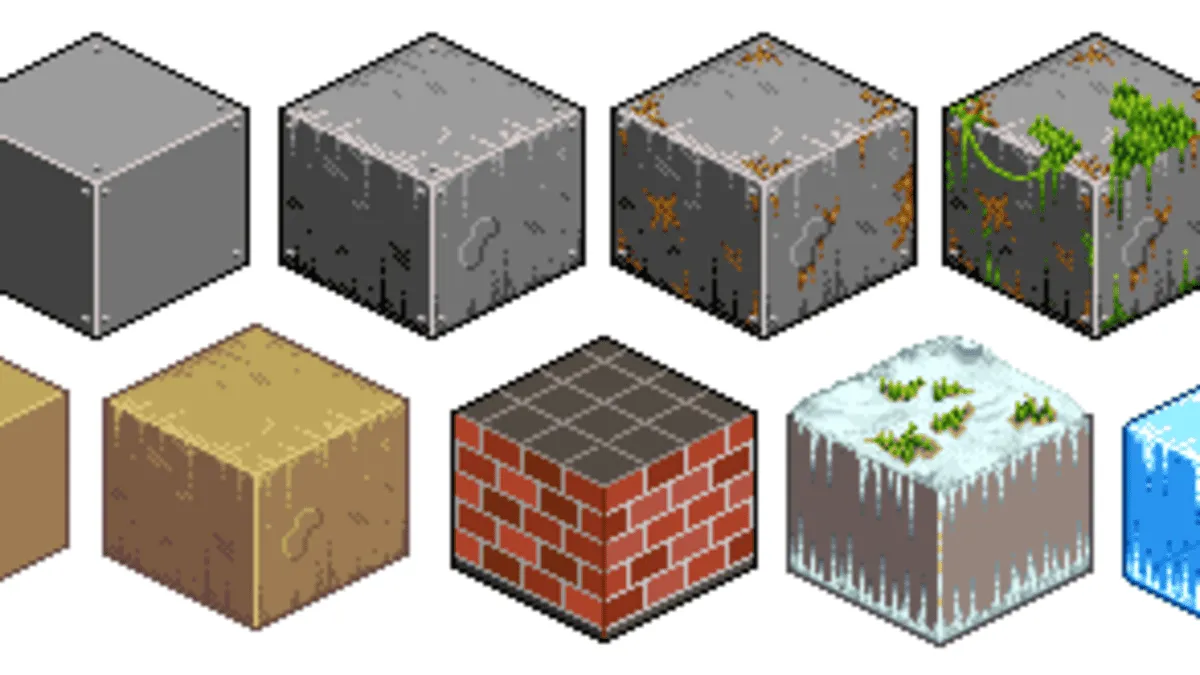
Isometric pixel art tutorials are often the gateway for artists who want to move from simple sprites to detailed, professional-looking game environments. I still remember the first time I tried drawing an isometric room in pixels. Everything looked skewed, walls felt uneven, and the perspective made no sense. But the moment it clicked, it felt like unlocking a new visual language.
Isometric pixel art sits at the intersection of logic and creativity. It demands structure, patience, and observation, while still leaving room for personal style. This blend is why it remains so popular in indie games, mobile apps, and retro-inspired visuals.
This article is written from real hands-on experience with pixel editors, grid systems, and trial-and-error workflows. Whether you are a beginner or someone refining skills for professional projects, understanding the principles behind isometric pixel art can dramatically improve your results.
Table of Contents
ToggleUnderstanding the Basics of Isometric Perspective
Isometric perspective is different from traditional perspective drawing. There are no vanishing points, and all three visible axes follow consistent angles. This creates a sense of depth without distortion.
In pixel art, this consistency is critical. A single misplaced pixel can break the illusion. Learning how angles translate into pixel steps is one of the first challenges artists face.
Once the grid logic becomes second nature, building complex scenes becomes faster and more intuitive.
Why Isometric Pixel Art Still Matters Today
Despite advances in 3D graphics, isometric pixel art remains relevant. Many successful games use it to balance clarity, nostalgia, and performance.
Players often find isometric views easier to read. Objects are visible without camera movement, and environments feel structured yet immersive.
For artists, this style offers creative freedom without the technical overhead of full 3D modeling.
Tools Commonly Used in Isometric Pixel Art
Most artists start with simple pixel art software that supports grids and layers. The tool itself matters less than how well you understand its features.
Working with layers helps separate floors, walls, and objects. This keeps scenes organized and easier to adjust.
Zoom control and pixel-perfect brushes are essential. Precision defines quality in isometric work.
Learning Grids Through Isometric Pixel Art Tutorials
Grids are the backbone of isometric pixel art. They define angles, spacing, and proportions.
Many artists struggle initially because isometric grids don’t align with standard square grids. Learning how diagonal lines step across pixels takes practice.
Once mastered, grids become invisible guides that speed up workflow and reduce mistakes.
Building Simple Shapes Before Complex Scenes
Every detailed isometric scene starts with basic shapes. Cubes, prisms, and stairs teach volume and alignment.
Practicing simple objects trains your eye to recognize correct angles. It also builds confidence before tackling full environments.
This approach mirrors how architects and game designers think in forms rather than details.
Lighting and Shadows in Isometric Pixel Art
Lighting defines depth and realism. In isometric art, light direction is usually consistent across the entire scene.
Shadows are simplified but intentional. Even minimal shading can dramatically enhance form.
Understanding how light falls on isometric shapes helps objects feel grounded rather than floating.
Color Choices and Palette Control
Color selection plays a major role in readability. Limited palettes keep scenes cohesive and prevent visual clutter.
Many artists use slightly different shades for each plane of an object. This subtle variation creates depth without heavy shading.
Palette discipline also helps maintain a consistent visual identity across assets.
Environment Design Using Isometric Pixel Art Tutorials
Designing environments is where isometric pixel art truly shines. Rooms, cities, and landscapes feel organized and interactive.
Thinking in layers helps. Floors establish space, walls define boundaries, and objects add storytelling details.
Good environment design guides the viewer’s eye naturally through the scene.
Characters in Isometric Pixel Art
Characters in isometric view require balance between simplicity and clarity. Proportions are often stylized to remain readable at small sizes.
Animating characters adds another layer of complexity. Each frame must respect the same perspective rules.
Consistent character scale is essential when placing them into environments.
Common Mistakes Beginners Make
One common mistake is mixing perspectives. Even slight deviations can make scenes feel wrong.
Another issue is over-detailing. Pixel art benefits from suggestion rather than realism.
Learning to simplify without losing identity is a skill developed over time.
Developing Speed and Efficiency
Speed comes from repetition. The more objects you build, the more familiar patterns become.
Saving reusable assets like stairs or furniture speeds up future projects. This is common practice in game studios.
Efficiency doesn’t mean rushing. It means reducing unnecessary steps.
Real-Life Applications of Isometric Pixel Art
Isometric pixel art is widely used in games, UI illustrations, and marketing visuals. Its clarity makes it ideal for interactive designs.
Many indie developers rely on this style to create immersive worlds with small teams.
For freelance artists, isometric assets are often in high demand.
Learning Through Observation and Study
Studying existing games and artwork accelerates learning. Observing how professionals handle angles and shading reveals subtle techniques.
Recreating small sections of admired artwork can be an effective exercise.
This form of study builds visual memory and technical confidence.
Personal Style Within Isometric Rules
While isometric art follows rules, there is room for personal expression. Color choices, line thickness, and detail levels vary widely.
Some artists prefer clean and minimal styles, while others embrace rich textures.
Developing style comes from experimenting within structural boundaries.
Advanced Techniques in Isometric Pixel Art Tutorials
Advanced work includes multi-level structures, curved surfaces, and atmospheric effects.
These techniques push the limits of pixel art while staying within isometric constraints.
Mastery here often separates hobbyists from professionals.
Consistency Across Large Projects
Large scenes require strict consistency. Scale, lighting, and perspective must remain uniform.
Artists often create reference sheets to maintain alignment across assets.
This discipline is crucial for collaborative projects.
Practice Habits That Lead to Mastery
Short, focused practice sessions work better than occasional long ones. Repetition reinforces grid logic and muscle memory.
Saving early works allows you to track progress over time.
Improvement often feels slow until you look back and notice growth.
Teaching Yourself Through Isometric Pixel Art Tutorials
Self-learning is common in pixel art communities. Online tutorials, breakdowns, and shared workflows offer valuable insights.
However, applying what you learn through practice matters more than consuming content.
Experimentation turns theory into skill.
At its core, isometric pixel art tutorials are about understanding structure and creativity together. They train artists to think spatially, work precisely, and communicate ideas visually with minimal elements. Through consistent practice and observation, artists develop confidence in building worlds one pixel at a time. As skills grow, so does the ability to tell stories through carefully constructed isometric scenes, making this art form both technically rewarding and creatively fulfilling.
Read also: